Building ATAI: Our Opinionated CLI for Copilot at Scale
How we wrapped Copilot, to accelerate the use of AI engineering tools at Autotrader

Most "AI coding" conversations I see online are from small start-ups, or people working alone in isolation. Once you start to think about rolling this out to an organisation the size of ours, questions like the following become critical to success:
- How does everyone get the same setup?
- How do prompts/skills/instructions stay up to date?
- How do we wire critical internal tools safely?
- How do we stop every team or individual reinventing local scripts?
For us, the answer was building an opinionated CLI: atai.
atai is not an IDE replacement, and it is not "yet another assistant UI".
It is a platform bootstrapper and runtime contract for how we use Copilot and related tooling at Autotrader.
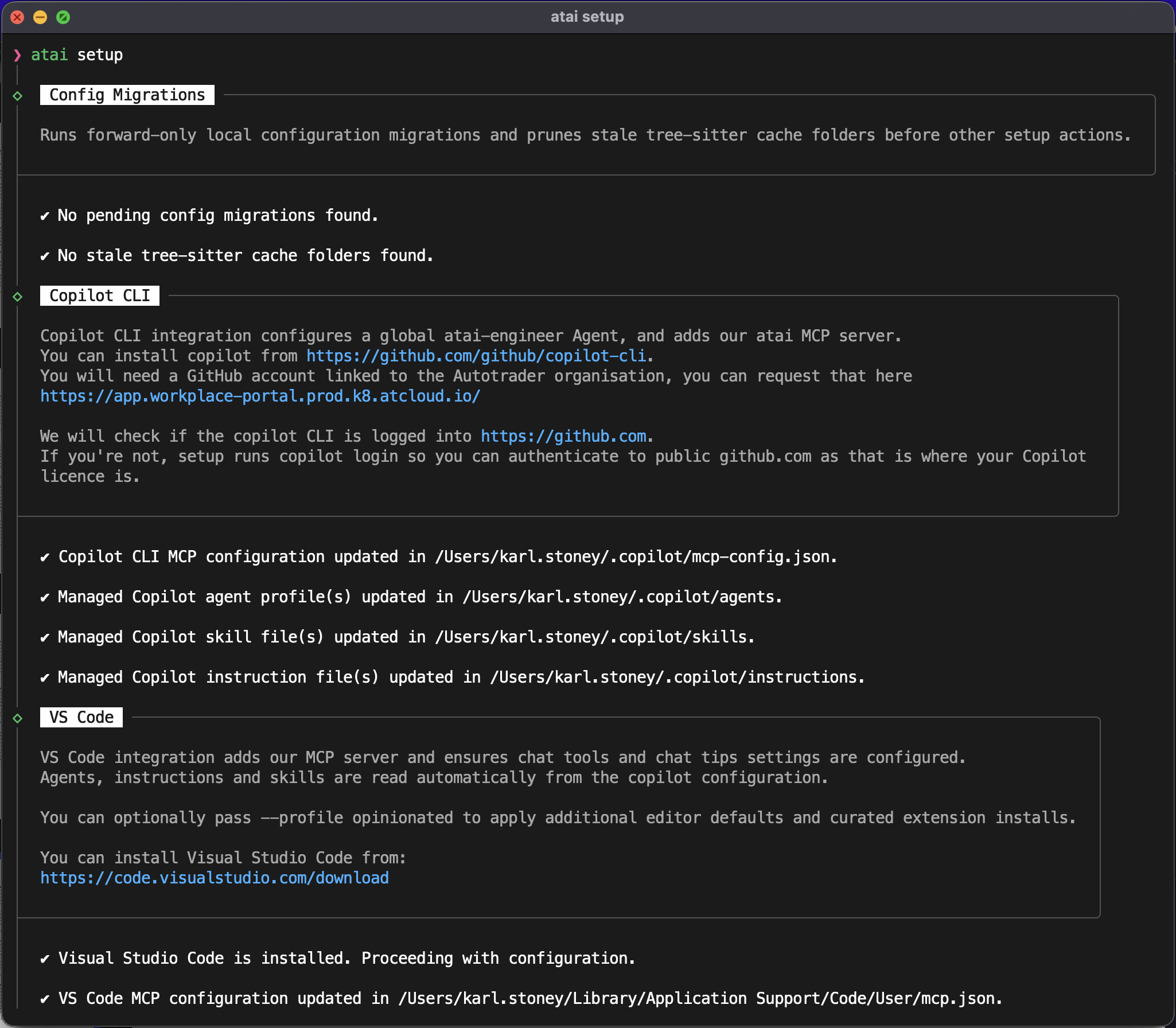
The problem we were trying to solve
Before atai, you could absolutely get productive with Copilot and custom prompts. But it was fragmented:
- Inconsistent local setup across engineers.
- Prompt and instruction duplication, and drift between repos.
- Tooling differences between local development and automated/CI environments.
- Manual update burden every time we improved conventions.
- MCP setup and configuration is still complex for many people so many don't do it, or if they do it - don't do it well!
The levels of capabilities with AI across the org also vary greatly, from some people who were still in the tab-completion stage of their journey to others building agentic systems.
This was a prime candidate for some "Platform Thinking". 80% of what people were using copilot for was broadly the same, lets make that 80% consistent and easy to consume.
What atai actually does
At a high level, atai sets up and maintains an opinionated AI coding environment, predominately based on copilot-cli, but also configures our main IDEs (VSCode and JetBrains stuff) which transitively use copilot.
Its core responsibilities include:
- Configuring local detected IDEs.
- Rendering managed instructions, skills, and agents.
- Wiring MCP servers/toolsets for approved internal systems, and authenticating the user, storing those credentials in the macosx keychain for the tools to use transparently.
- Handling setup/update lifecycle so changes roll out centrally.
From a user perspective, the day-to-day looks intentionally simple:
atai setup (for a first time install)
atai copilot (to run an opinionated copilot-cli)
atai update (to do an update, however these happen automatically)
The complexity is hidden in a consistent platform contract rather than repeated in every repo.
We standardised on copilot because we don't want to dictate the IDE engineers use, and copilot has native integration into all of the key players, as well as an excellent CLI.
You may have read my Building a PR Review post previously where we used gemini-cli, well you may also be interested to know after a long period of experimentation - we have completely pivoted away from gemini for software engineering tasks.Distributing prompts, skills, MCP, and guardrails across the org
One of the biggest practical wins is central distribution of AI behaviour.
atai manages reusable artefacts such as:
- Instructions (global and scoped defaults).
- Skills (structured workflows for recurring task types).
- Hooks (scripts that hook into copilot to try and improve security).
- MCP Configuration.
- Agent definitions.
- Hooks (guards) to prevent copilot running things we don't want it to run.
Because these are managed centrally, we can improve behaviour once and have it propagate through setup/update flows, instead of running a campaign of "please copy this snippet into your repo". It also gives us source control, and a pipeline for test and release.
This effectively lowers the bar to getting up and running with a good quality AI development experience.
Many of the "skills" that atai distributes are particularly useful to engineers deploying software on our platform, here are just a few examples:
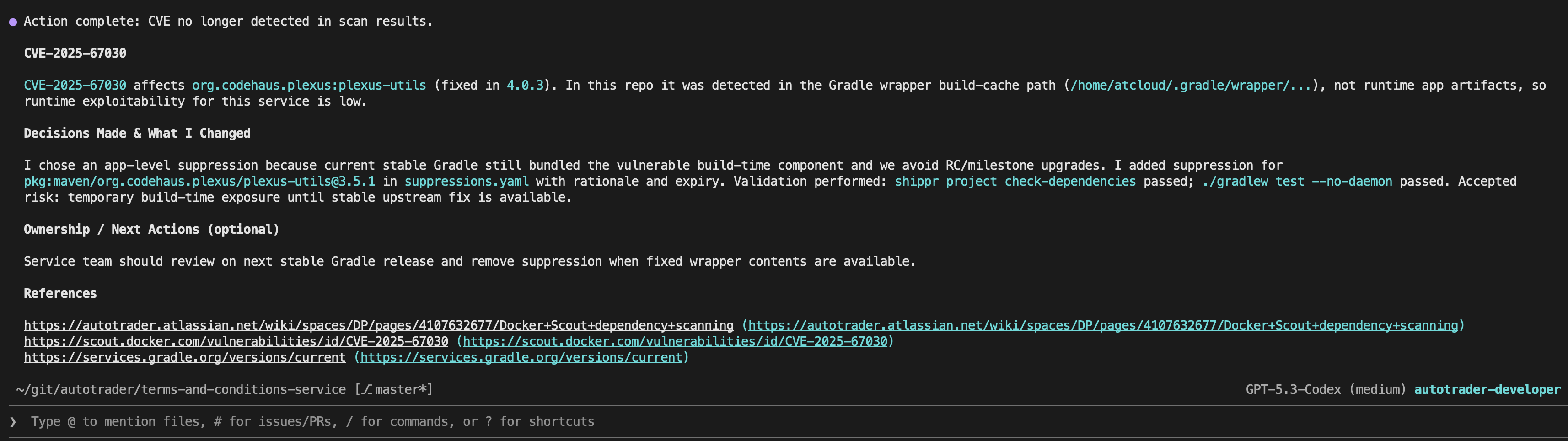
Diagnosing CVEs
We do vulnerability scanning on every build, atai has a skill that can investigate CVEs for you, and research their risk, impact, and mitigation options. This is a high TOIL task for engineers that can now be done asynchronously.
Bootstrapping Applications
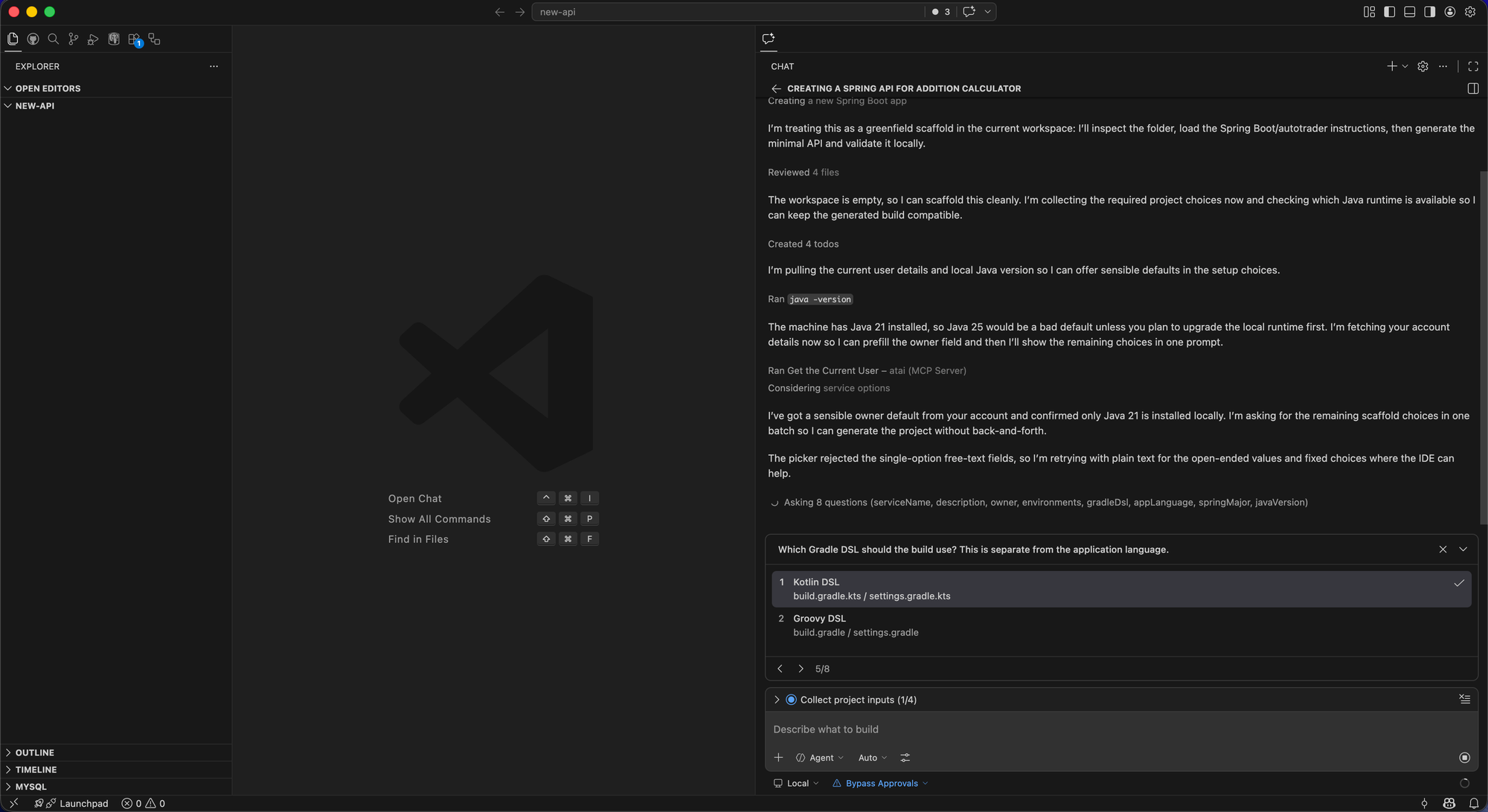
You can ask atai to build you a new API, and it will do so - to our service standards. Vibe coded apps are great, but rarely meet the quality bar for software we can deploy into production. ATAI contains enough knowledge of how we build applications to give you something much closer to our desired end state. The end result, after a few questions - is an application that's immediately compatible with our platform, using our libraries and frameworks.
Debugging Errors in Production
This is an example of where it really shines. If your application has some low level errors in production, debugging them involves looking at data from numerous different systems (logs, tracing, metric, release history, etc), and finding a fix. This is all quite time consuming, and if the errors aren't breaching any SLOs sometimes they will go continually deprioritised. With atai you can kick all of this off and come back to the result later. Just to demonstrate this, I kicked it off whilst writing this blog:

And by the time I was done, atai had gone off, queried logs, metrics, traces, looked at previous releases, cloned the repo, found the issue, added a failing test, fixed it, and raised a pull request to the service owners:

DevEx: Hooking into critical internal systems
The AI workflow above are only genuinely useful in engineering if they can interact with real systems, not just source files.
atai wires access to critical platform integrations via managed toolsets, including systems like:
- GitHub Enterprise - Where we store our code, and track work
- Jira - Where some people track work
- Confluence - Our Wiki, where it can access our whole knowledge base
- GoCD - Our CICD Tooling
- Elasticsearch - Where our Application logs are stored
- Jaeger - For application tracing
- DataHub - To access our Data Product catalogue
- Delivery Platform - Our Platform API for programatic access to our service catalog
The point is not "maximum tools". The point is controlled, discoverable, reusable integration patterns so engineers and agents can safely do meaningful work in real operational contexts.
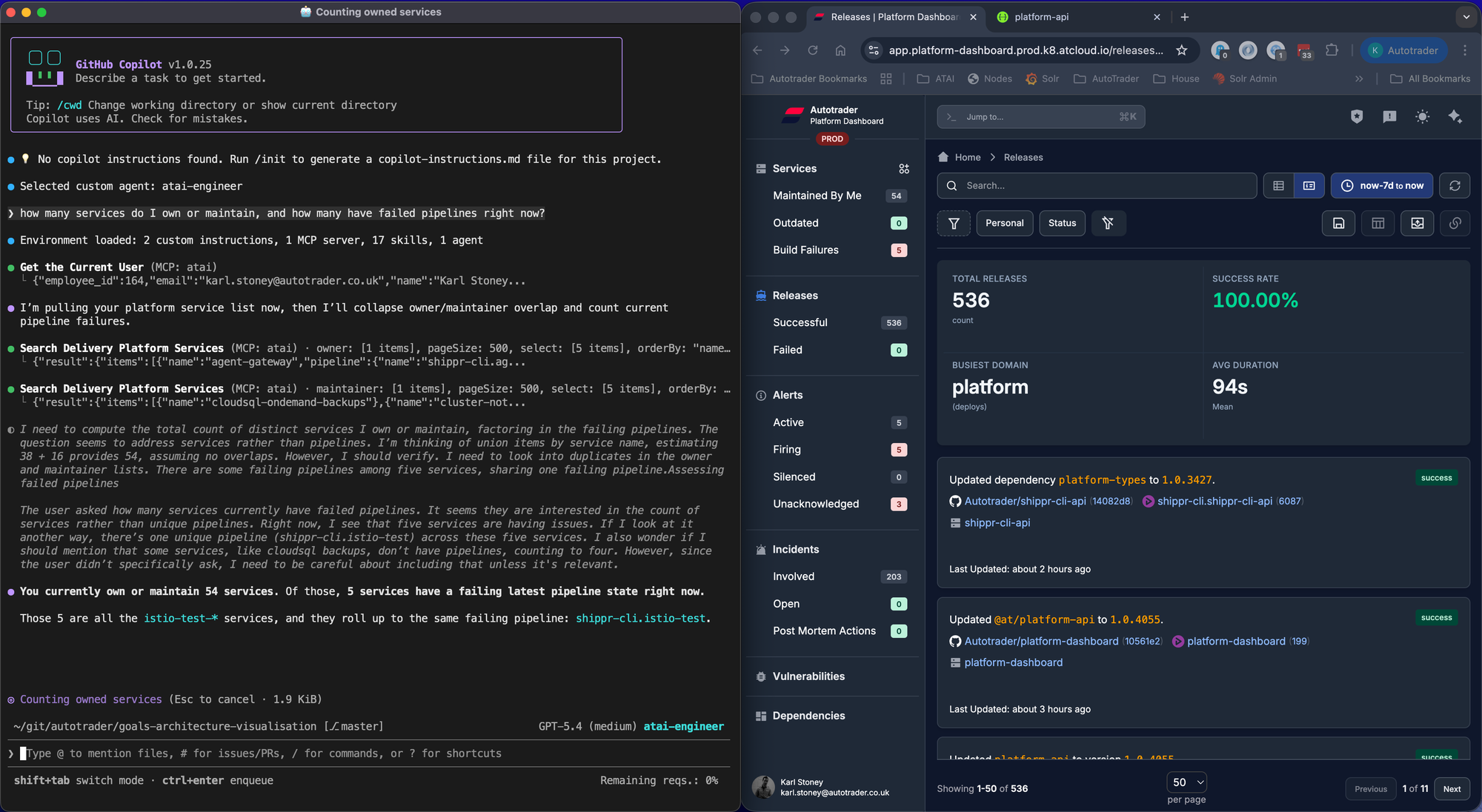
What happens when you do this well is your AI CLI becomes another UX for your underlying platform. We're incredibly proud of our Delivery Platform, the homogeneous way we build, test, deploy and observe services and the first-class APIs we have for exposing that data mean we can run fast at rich user interfaces and provide a consistent experience.
Here, on the left you see atai and on the right you see platform-dashboard. Both are interfaces onto the same underlying platform data.
Keeping behaviour aligned with CI and automation
Another non-obvious requirement: local behaviour and CI behaviour should not diverge wildly.
With atai, we can keep the same managed setup model in environments where autonomous work runs, not just on laptops.
That gives us:
- Fewer "works on my machine" differences in agent behaviour.
- Easier debugging when a workflow behaves differently.
- Clear versioned rollout of instruction/skill/runtime changes.
The future vision is to be able to do anything you can do locally in a distributed fashion too. You should be able to kick off a remote task, but be able to do the exact same task locally if you wish to debug it.
Self-updates and lifecycle management
If adoption depends on everyone manually upgrading and reconfiguring, it stalls.
atai includes an update path that re-runs setup, so platform improvements can roll out continuously with minimal friction. As one component of atai is the MCP server, that server self-updates atai when it runs.
Tool Token Usage
As mentioned above, we have a reasonable amount of prompts, skills, and importantly "tools". These all take up tokens, and impact the performance of any AI interactions. Lets just take GitHub for example, there are SO many operations you can do on GitHub, and their official MCP server has them exposed as tools and tool sets. If you want your agent to be able to do most things with GitHub, that's a lot of tools to expose. Then layer on top of that Jira, Confluence, etc.
So we took a different approach and instead adopted codemode. codemode is actually a surprisingly simple concept, you expose just two tools:
- A discovery tool, that allows you to search available APIs on the client, for example "issue" in the github approach, and it returns a list of those methods.
- An execution tool, this allows the llm to write raw javascript interacting with the github SDK (octokit). Server side, we execute that code in a sandbox and provide a pre-authenticated
octokitclient.
The result? Two tools, hardly any tokens, and complete API access to GitHub. Have a read of Cloudflare's blog post on this in more detail:
 Matt Carey
We also took a similar approach for Elasticsearch. We have multiple indicies in elasticsearch for things like logs, metrics, traces, etc. We expose two tools:
- A get index field capabilities. This tool, you pass it the target index alias (eg
logs,metrics, etc). This queries elasticsearch and returns the field metadata for a subset of fields we want the bot to be able to query on. That field metadata is enough knowledge for the llm to be able to craft ElasticSearch queries effectively. - An execution tool. The LLM provides the raw query as guided by the field caps, which we execute server side in an sandbox with an authenticated elastic client.
Observability
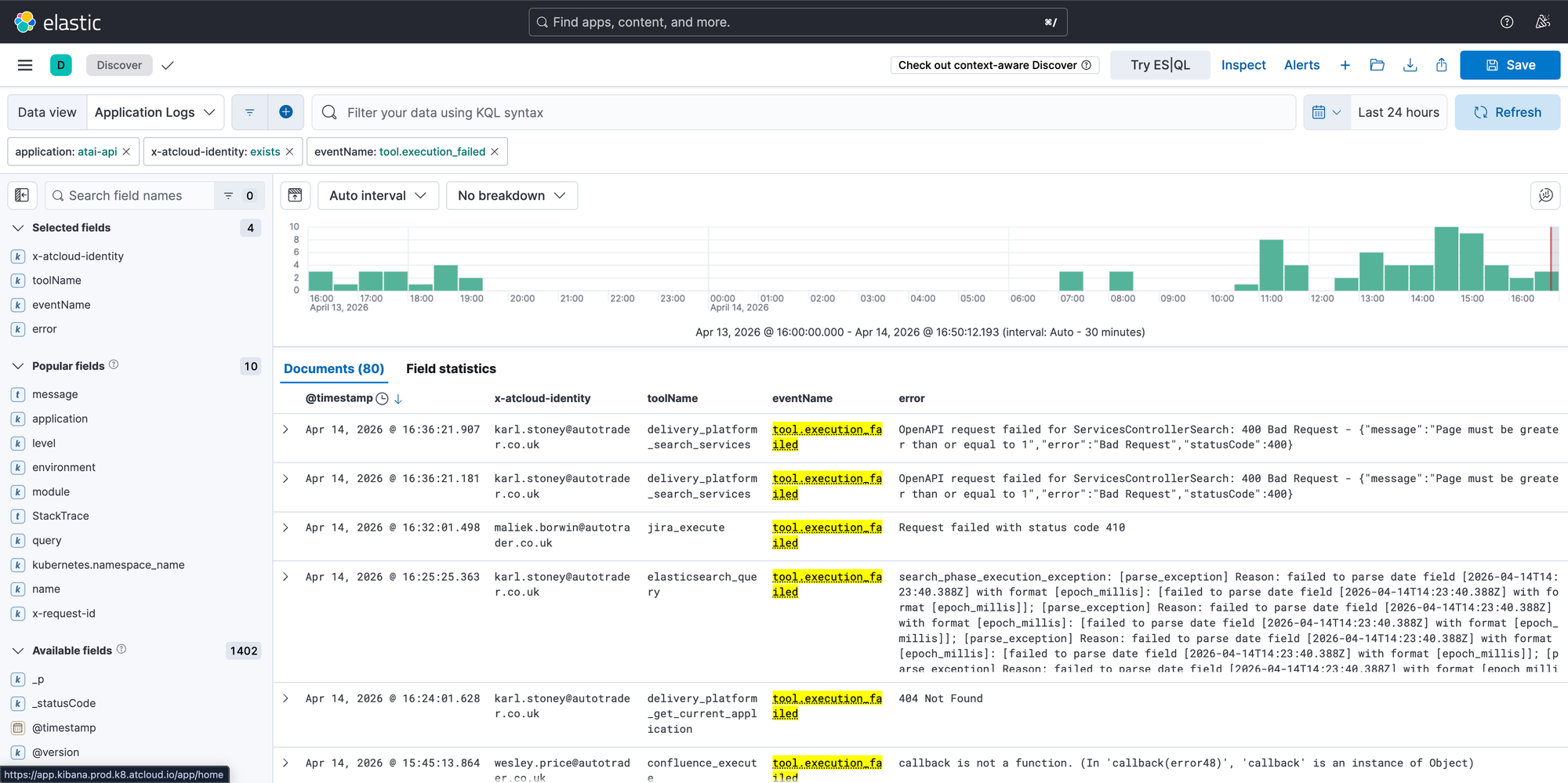
AI as we all know is non-deterministic, which means with the best will in the world, it will absolutely go wrong. Putting my DevEx hat on, I want to know when it's going wrong without relying on engineers telling me, or worse, complaining in silence. Our MCP server which wraps all of our integrations has custom reporting on tool usage and success. With this data, we are able to proactively fix and improve the MCP tools and prompts, identify poorly performing tools, etc. We are also able to discover what tools are being used, and which aren't, in order to delete unused stuff.
Final thought
I encourage you think about your AI configuration "as code", and treat it as such. So think about revisions, testing, distribution, rolling back, monitoring and so on. Without this, you will have chaos, and organisation with everyone doing similar things slightly differently with varying levels of success. Instead create a capability that allows you to all pull together in the same direction and accelerate each other.
We've actually taken this a step further and built a system that allows us to distribute atai work onto a cluster of workers... blog post on that coming soon!